FMTC features monetized offers from more than 14,000 merchant affiliate programs. This week we added 117 new FMTC merchants including BBQGuys, Jonathan Adler, Kiwi.com, Montblanc & Savage X Fenty. All of the new merchants, affiliate program signup links, as well as their associated networks, are listed below. For a complete list of all merchant programs, […]
Two-factor or two-step authentication (also known as 2FA) is a method of accessing an online or computer system account where the user is required to input two sets of information. This usually consists of a standard username/email + password and a generated security code.
Requiring a user to provide a special code in addition to a password greatly decreases the probability of their account being breached by hackers.
The codes used for 2FA are most often created by authenticator apps like Google Authenticator. These can be downloaded and installed on a user’s smartphone from corresponding app stores.
Once integrated with the user’s account, usually through a QR code, the authenticator will generate a unique set of characters that the user will then use to log in. New codes are then regenerated frequently to provide further security.
Why MaxBounty uses 2FA for Affiliate Accounts
Protecting our affiliates’ information has always been important to us. The increasing rate of online data breaches and identity left has only made it more of a priority. Therefore, we felt it was necessary to create an added layer of protection between your sensitive information and potential hackers.
That is exactly the purpose of 2FA.
When you enable two-factor authentication, it becomes significantly more difficult for someone to gain access to your account. Automated bot attacks specifically are almost completely negated by 2FA.
The level of protection it offers is more than worth the 1-2 minutes it takes to activate.
Although we highly recommend EVERY affiliate sets up 2FA, it is optional until you surpass a certain earnings threshold. After that, it will become a mandatory requirement. You will then need to set-up 2FA to be able to log in to your account.
How to Set-up 2FA on Your MaxBouny Account
The first time you log in to your MaxBounty account, you will see the following pop-up that will ask you whether you would like to set-up 2FA now OR to wait:
If you choose “Not now”, this pop-up will continue to appear on the login screen once a month.
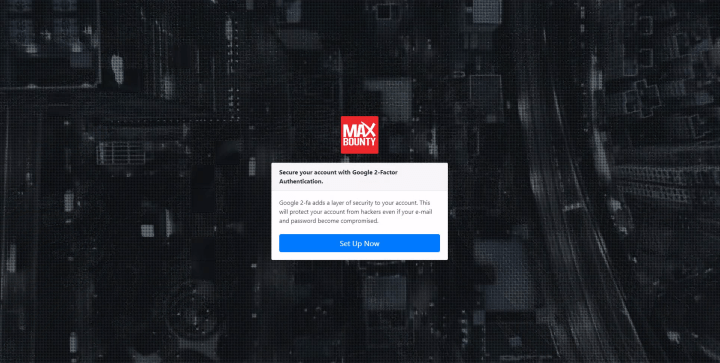
If you choose “Yes”, you will see this notice appear:
Follow the three steps displayed to activate 2FA on your account immediately.
If you previously chose to not set-up 2FA on your account but now wish to do so, please follow the steps below.
2. Click on the person icon in the top right corner of the Affiliate Dashboard.
3. Click on ‘Settings’.
Your dashboard should now look like this:
4. Click on the yellow ‘Edit’ button in the top right corner.
You will then be sent a confirmation email that includes a code that will allow you to edit your profile settings.
5. Open the confirmation email and input the code provided.
You should now see that you have the ability to edit each individual section like this:
6. Click on ‘Set up Google Authenticator’ under the ‘2-Factor Authentication’ section.
You will then see a pop-up with a set of steps:
7. Follow the steps to complete 2-step Verification Setup.
Download the Google Authenticator App from Apple Store or Google Play.
Open the app and then scan the QR code that is displayed on your Affiliate Dashboard.
Enter the 6-digit code the app gives you and click ‘Activate’.
You should then see the following green notice indicating that 2FA is now activated on your account:
How to log in to MaxBounty using 2FA
To log in going forward, simply input your username and password as usual. Then, open the Google Authenticator app on your device and input the displayed 6-digit code to complete the 2FA login.
You should now have access to your MaxBounty account. If you do not, read the FAQ below.
Additional FAQ
Q: Why is my security code not working?
A: If your code is not working, it is likely because of one of two reasons:
Your phone time is set to automatic and/or your battery saver is on.
You need to reset the cookies/cache on your web browser (found in settings) OR alternatively you can try using a different browser.
If the problem still persists, please contact your Affiliate Manager.
Q: Do I need to scan the QR code every time I log in?
A: No. Once you have used the QR code to set up the app on your phone, you will only require the 6-digit code within the app to log in to your account going forward.
Q: Can I re-use the same code?
A: No. The 6-digit code regenerates every 30 seconds. You will need to open the app and use the current code provided each time you log in.
Q: Do I need to keep the Google Authenticator app on my device?
A: Yes. If you delete the app, you will need to go through the set-up process again from the beginning.
Q: What do I do if I need to replace the device that contains the Google Authenticator app?
A: If you are planning on switching to a new mobile device, you should first log in to your MaxBounty account using the Google Authenticator on your old device, and then disable your current 2FA . Then, go through the set-up process on your new device while you are still logged in.
If your initial device became damaged or if you simply forgot to do this, contact your Affiliate Manager and ask them to reset 2FA for you. You will then be prompted to set up 2FA again when you go to log in and can do so using your new device.
Q: I have multiple people who need access to my affiliate account. Can we all use the same 2FA?
A: It is possible to set-up 2FA for multiple people on a single account. If this is something you require, please talk to your Affiliate Manager about the process.
Q: Can I remove 2FA from my account?
A: We highly recommend that every affiliate sets up 2FA on their account. However, there are rare cases where we will remove it for you. If you feel you have a valid reason for removal, please talk to your Affiliate Manager.
If you have any additional questions regarding 2FA or setting up 2FA on your MaxBounty account, do not hesitate to contact your Affiliate Manager.
We use cookies on our website to give you the most relevant experience by remembering your preferences and repeat visits. By clicking “Accept”, you consent to the use of ALL the cookies.
This website uses cookies to improve your experience while you navigate through the website. Out of these, the cookies that are categorized as necessary are stored on your browser as they are essential for the working of basic functionalities of the website. We also use third-party cookies that help us analyze and understand how you use this website. These cookies will be stored in your browser only with your consent. You also have the option to opt-out of these cookies. But opting out of some of these cookies may affect your browsing experience.
Necessary cookies are absolutely essential for the website to function properly. These cookies ensure basic functionalities and security features of the website, anonymously.
Cookie
Duration
Description
cookielawinfo-checbox-analytics
11 months
This cookie is set by GDPR Cookie Consent plugin. The cookie is used to store the user consent for the cookies in the category "Analytics".
cookielawinfo-checbox-functional
11 months
The cookie is set by GDPR cookie consent to record the user consent for the cookies in the category "Functional".
cookielawinfo-checbox-others
11 months
This cookie is set by GDPR Cookie Consent plugin. The cookie is used to store the user consent for the cookies in the category "Other.
cookielawinfo-checkbox-necessary
11 months
This cookie is set by GDPR Cookie Consent plugin. The cookies is used to store the user consent for the cookies in the category "Necessary".
cookielawinfo-checkbox-performance
11 months
This cookie is set by GDPR Cookie Consent plugin. The cookie is used to store the user consent for the cookies in the category "Performance".
viewed_cookie_policy
11 months
The cookie is set by the GDPR Cookie Consent plugin and is used to store whether or not user has consented to the use of cookies. It does not store any personal data.
Functional cookies help to perform certain functionalities like sharing the content of the website on social media platforms, collect feedbacks, and other third-party features.
Performance cookies are used to understand and analyze the key performance indexes of the website which helps in delivering a better user experience for the visitors.
Analytical cookies are used to understand how visitors interact with the website. These cookies help provide information on metrics the number of visitors, bounce rate, traffic source, etc.
Advertisement cookies are used to provide visitors with relevant ads and marketing campaigns. These cookies track visitors across websites and collect information to provide customized ads.