How Affiliates Can Adapt to Google’s Decreased Search Term Visibility

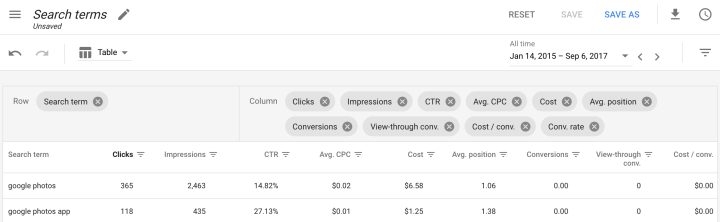
Mapping Reports to the Google Ads UI | AdWords API | Google Developers

Earlier this Fall, Google made alterations to the search terms report in their Google Ads platform.

“We are updating the search terms report to only include terms that were searched by a significant number of users. As a result you may see fewer terms in your report going forward.”

Unfortunately, those alterations are providing advertisers with fewer user search queries than ever before.  

Despite Google stating that they’re only eliminating terms that aren’t searched by a significant number of users, this still ultimately translates to less data for advertisers

This is concerning for affiliates because the search terms report has always provided valuable information that assists with campaign optimization.

It’s important to note that Google has never disclosed ALL search queries. They’ve always stated that many private or sensitive searches are not displayed in the search terms report. However, this recent change shifts the visible/hidden ratio.   

This reduction in search term visibility is concerning for several reasons:

  • It makes it more difficult to analyze trends and discover common themes among low-click queries
  • Creating single-word ad groups becomes more challenging
  • It can lead to lower ad bidding which could translate to reduced conversion rates

If you’re unhappy about this change, your only real choice if you want to continue using the platform is to adapt. This is the case with most major ad platform modifications.

Google would not have made the change in the first place if they didn’t plan on keeping it in place.

What Should Affiliates Do?

Luckily for you, being an affiliate means you’re well equipped at adapting.

Here’s what we suggest you do if this change is affecting your Google Ads performance.

1. Utilize other Platforms

If you also use Microsoft/Bing ads to obtain search traffic, you can apply some of the information you gain in that platform’s search terms report to Google Ads.

There’s been no indication that Microsoft will be limiting search queries like Google. Running similar search term reports will provide you with search queries that can assist you in adding negative and positive keywords in your Google Ads campaigns.

2. Continue to Optimize

Although you may now have less data to utilize, it’s just as important as ever to use whatever you can to optimize your campaigns.

Keep in mind that the search data that Google will continue to show you is ultimately the most important. You’ll still be receiving substantial search data that you can use to determine how to improve.

2. Use Google’s Keyword Planner

You might already be using this tool, but if you’re not, doing so can assist you in combating reduced search term visibility.

It’s useful because it can help you research potential searches which you can use to further optimize your campaigns. This will provide you with additional insight which can assist you in your decision-making.

4. Explore other Traffic Sources

If you find that this change is hindering your ability to find success with search ads. This could be a good time to experiment with those other traffic sources you’ve been eyeing.

Whether you’re looking to get into email, display, native, or social, diversifying your affiliate skillset is always valuable if you plan on having a long career in affiliate marketing.

The post How Affiliates Can Adapt to Google’s Decreased Search Term Visibility appeared first on MaxBounty Blog.

,Read More

Use gift guides to generate affiliate sales during the holidays

Especially during 2020, Q4 is a great time for publishers to use gift guides to increase affiliate commissions.

Last year on Awin and ShareASale, we tracked over $8.4 million publisher commissions across Cyber Weekend, with a 22% increase YoY. With lots of changes due to the global pandemic, consumers will be turning online for their holiday shopping needs more than ever before. This reinforces the importance of preparing ahead and finding new ways to provide value to your readers, making the holiday shopping and gift giving process as smooth for them as possible. The easier you make the process, the more your affiliate efforts will succeed throughout the entire quarter.

A great way to do this is by creating a gift guide. Essentially a gift guide removes the need to scour the internet to find the perfect gift for someone’s mom, dad, grandparent, friend, child’s teacher, new coworker…. because you’ve already done that and rounded up the best of the best for your readers to choose from.   

Unsure of where to start? We’ve outlined creating a gift guide in five easy steps.

Step 1: Choose the recipient

Before hunting for products, first you’ll have to know what type of consumer or theme you’re going to focus on. From there, you’ll be able to determine the type of gift guide you’re looking to create. Is budget fashion your readers’ passion? Try ‘Gift Guide for the Fashion Forward Under $50.’ Are you a lifestyle blogger? Consider ‘Gift Guide for the Ultimate Host.’ 

Step 2: Select the relevant products 

Once you have determined who your gift guide is for, you can start selecting the products and retailers to include. We recommend featuring six to 12 products in your gift guide, each picked specifically for the recipient. For example, ‘Gift Guide for the Ultimate Host‘ could showcase candles, serving platters, napkin holders, a cheeseboard, wine glasses, and a fun board game for the perfect night in with family. 

While finding products can sometimes be a challenge, don’t let that stop you. One easy way to identify the latest and greatest for the holidays is by browsing our 2020 Gift Guide or by looking at emails from various advertisers. If the highlighted products in the email newsletter aren’t exactly what you were looking for, you may discover inspiration to search for other ideas. Odds are most of the types of products and brands you want to feature have an affiliate program on Awin or ShareASale, if not both. 

Another great tip is to reach out to any merchants already converting on your site and ask for recommendations about popular seasonal products, anything that seems to be a popular gifting item, and upcoming new launches for the holidays.  It is important to note that some retailers won’t reveal any pertinent information until very close to Black Friday, so prepare for potential last-minute additions and edits.

Step 3: Build your blog post

After finalizing your theme and products and brands to be featured, it’s time to write your gift guide. When building your post, make sure to tell your audience a little bit about the brands and products and why you chose them. Share the honest pros and cons of each and summarize your experience and opinion. It’s okay if you don’t have personal experience for each item or retailer – these gift guides are suggestions, not necessarily recommendations. 

Lastly, it’s no secret that high-quality images and videos can make a big difference in a post’s engagement and boost SEO, so ensure you’re including a visual aid for each item, whether that be a product shot, lifestyle image, or video tutorial – just confirm you have permission from the retailer to include.

Step 4: Add in affiliate tracking links

You’ve put in a lot of time and effort to build your gift guide, make certain your hard work is rewarded and you receive a commission for every sale you drive by adding in affiliate tracking links. As with any affiliate post on your blog, confirm you’re following the disclosure guidelines outlined by the FTC.  

Once you’ve completed the above steps, you can be confident you’re putting your best gift guide foot forward for Q4 success. Don’t stop at just one! We recommend creating multiple guides, catered to your audience – perhaps one for your friends, one for kids, one for co-workers, one for pets… you get the idea. 

Step 5: Schedule an ongoing social campaign

To maximize your efforts, leverage your social platforms to continuously bring attention to your gift guides throughout the shopping season. Create an ongoing schedule of posts to go out on your social accounts, directing your followers to these posts. Use a variety of imagery and specific merchant callouts to vary your feed and increase traffic to those pages in the hopes of ultimately increasing your affiliate income.

Continue to visit the Awin and ShareASale blogs for additional resources to support your affiliate efforts during the holidays, including Q4 checklists, trend forecasts, seasonal newsletters, webinars and more.

The post Use gift guides to generate affiliate sales during the holidays appeared first on ShareASale Blog.

,Read More